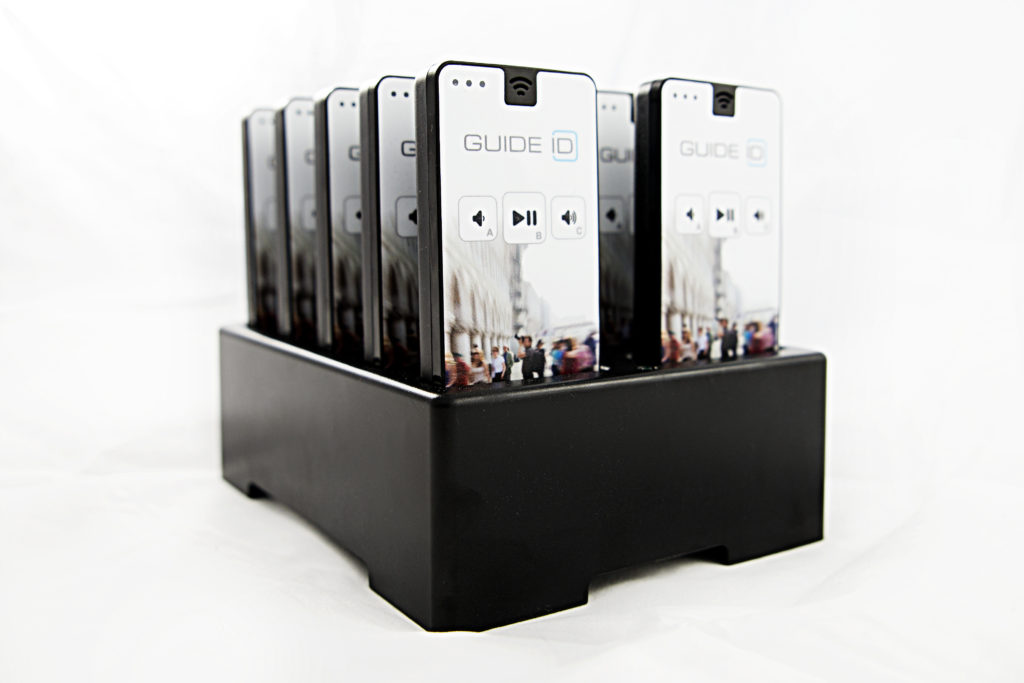
Podcatchers have to be recharged periodically. This is done, along with installing any new software for the player and receiving new audio files that have been published, by putting them into a docking station. The docking station is connected to power and to a PC with the Podcatcher Sync software installed. A computer configured in such a way is known as a ‘Sync Console’ and is provided by us. All customers which already have our system in use (since before June 2020) will have a Sync Console at their location. If they would like to add Podcathers to their basic setup, or for a temporary exhibition, they will receive a Sync Console.
Please have a look on this page to learn more about the Sync Console
Since June 2020 we are also implementing a new product, called the Syncbox. This has the same functionality as the Sync Console but is not a windows based PC, but a compact computer, designed by Guide ID.
Every new customer will receive the Syncbox.
Please have a look on this page to learn more about the Syncbox
For every location where you’d like to synchronize your Podcatchers (such as a hand-out point) a Sync Console or Syncbox needs to be set up to be able to sync them. By default, the Sync Console and Syncbox will attempt to synchronize files on a daily basis at 19:00 (7 PM) local time.
If you want to add your own PC as an additional Sync Console please see these links; click here to learn more about installing the required software, or click here to go to the computer specifications page
This Podcatcher Sync Errors Specsheet gives you more information about the LED lights on the Podcatcher in case of an error.
The Interactive IDentifier is a special IDentifier which makes it possible to send visitor data from the Podcatcher to an interactive application developed by a third party (like an interactive design agency).
Software must be installed on a Windows computer that the application can use to communicate with one or more connected Interactive IDentifiers.
Here you’ll find the specsheet of the Specsheet IDentifier Interactive
For more information about the set up of the Interactive IDentifier please contact us: helpdesk@guideid.com
Want to know which products we offer and what it can do? Take a look at this specsheet to get an overview of our products.
Specsheet Podcatcher-Products_2021
The Podcatcher can sound an warning beep when it receives a signal from the Warning IDentifier, which might help preventing Podcatchers from going missing. In the specsheet you’ll find more information about the Warning IDentifier.
Specsheet Warning IDentifier
You can find more information about the audio files here Specsheet Audio.
The Syncconsole is the connection between the Podcatcher Portal and the hardware. Standard Syncconsoles delivered by us, will have TeamViewer installed so we are able to connect with the Syncconsole from a distance. If you would like our support, you can always contact our helpdesk. If we have to look into the Syncconsole to resolve a problem, we will inform you first.
We always recommend to connect the Sycconsole onto your ‘guest network’ so your internal network is protected at all times. Your system administrator will be able to do this for you as it’s his responsibility.
This specsheet gives you more information about the Syncconsole we deliver, a NUC.
Specsheet Sync-Console (NUC)
The Cabinet Block is a stand alone compact charging and synchronization unit, that can hold up to 100 Podcatchers (10 dockingstations).
The Cabinet Tower is a unit that can hold up to 300 Podcatchers. The Tower configuration exists of 4 cabinet blocks; 3 with Podcatchers and one empty block to ensure the right height.
Please take a look at this the specsheet for more information and measurements;
Specsheet Cabinet Block and Tower 2020
If you wish to make your own furniture, please have a look on this page
The Podcatcher can synchronously play the audio of a movie when the movie is equipped with a AV-Sync Track.
In the specsheet you can read what a AV-sync set contains and what the measurements are: Specsheet AV-Sync
The Dockingstation is a compact charging- and synchronisation station that can hold up to 10 Podcatchers. Please take a look here: Specsheet_Dockingstation for info and measurements.
Note: a Dockingstation can be placed on a flat surface (table-top) or wall-mounted. It is also possible to built the Docks in a piece of furniture. There are a few guidelines to keep in mind when doing that.
 English
  Nederlands
  Français