
Voorkomen dat uw Podcatchers worden vermist...
Introductie
Als een bezoeker een Podcatcher gebruikt, kunt u verwachten dat hij of zij deze na gebruik weer terugbrengt. Sommige bezoekers kunnen dit echter verwaarlozen of gewoon vergeten. Om het aantal Podcatchers dat na verloop van tijd 'verdwijnt' te verminderen, zijn er twee manieren om een in de Podcatcher ingebouwd waarschuwingssignaal te activeren om bezoekers te waarschuwen dat ze het apparaat moeten terugbrengen. De eerste is een speciaal ID-kenmerk dat het Waarschuwings ID-kenmerk wordt genoemd, de tweede is een Podcatcher-instelling, namelijk het "inactieve tijdalarm". U kunt een van beide, geen van beide of beide gebruiken, afhankelijk van wat u gepast vindt.
Warning IDentifier
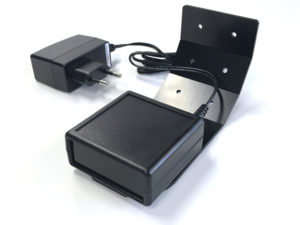
De Podcatcher kan zijn waarschuwingssignaal laten klinken wanneer hij een Waarschuwings-IDentifier-code ontvangt. Dit is een speciale IDentifier die meestal in de buurt van de uitgang van het gebouw wordt geplaatst, zodat bezoekers op het juiste moment moeten worden gewaarschuwd.
De voordelen van deze methode zijn dat het waarschijnlijker is dat Podcatchers na verloop van tijd worden afgegeven (vooral als u een koordje of polsbandje hebt bevestigd) en dat uw personeel weet dat het specifieke bezoekers moet vragen om de speler terug te brengen voordat ze het gebouw verlaten.
Het nadeel is dat de IR-signaal gaat niet veel door in de vorm van stof of leer, wat betekent Podcatchers geven geen waarschuwingssignaal als het in een zak of tas stoppen.
Installatie van de Warning IDentifier
LET OP: Kijk niet van dichtbij rechtstreeks in de voorkant van de Warning IDentifier! De infrarode LED's in het apparaat zijn onzichtbaar voor het menselijk oog, maar zijn zeer helder, vooral van dichtbij.
Tests:
- Steek de adapter in een stopcontact en de adapterstekker in de 9V DC-ingang van de Warning IDentifier. Hoewel er ook een RCA-aansluiting op de achterkant zit, hoeft u alleen de 9V DC adapterstekker aan te sluiten en niets anders.
- De 2 LED's aan de achterzijde knipperen een paar seconden groen.
- Dan zal de Warning IDentifier beginnen met het verzenden van alarmcodes. De bovenste LED moet rood zijn en de onderste LED moet groen knipperen elke keer dat een waarschuwingssignaalcode wordt verzonden (ongeveer 4x per seconde).
- Neem een Podcatcher uit het Dockingstation. Het waarschuwingssignaal moet klinken wanneer u zich binnen het bereik van de Warning IDentifier bevindt. Het zal ongeveer 120 seconden klinken. U kunt het geluid van het waarschuwingssignaal stoppen door op een van de knoppen op de Podcatcher te drukken, maar wanneer u zich nog steeds binnen het bereik van de Podcatcher bevindt, zal het opnieuw klinken!
Configuratie:
U kunt het zendvermogen van de Warning IDentifier wijzigen door de rood/witte schakelaars aan de achterkant van het apparaat in te stellen.
De verandering vindt onmiddellijk plaats en elke verhoging voegt ongeveer 2-3 meter bereik toe.
Schakelaar 1 omhoog, alle andere omlaag = 25% intensiteit
Schakelaar 1 en 2 omhoog, alle andere omlaag = 50% intensiteit
Schakelaar 1, 2 en 3 omhoog, alle andere omlaag = 75% intensiteit
Schakelaar 1, 2, 3 en 4 omhoog, alle andere omlaag = 100% intensiteit
Montage:
Podcatchers kunnen alleen op het waarschuwingssignaal reageren als ze binnen het zichtbare bereik van de Warning IDentifier zijn. De Warning IDentifier zendt infraroodsignalen en infrarood gaat niet door objecten heen, daarom werkt de Warning IDentifier het beste als de Podcatcher er rechtstreeks op gericht is. Het is verstandig om de Waarschuwings-IDentifier zo te plaatsen dat de kans het grootst is dat hij een Podcatcher 'bereikt'.
Bij het monteren van de Warning IDentifier in de buurt van een uitgang, kunt u deze het beste aan het plafond plaatsen in de richting van de bezoekers in het gebouw, zodat bezoekers die in de richting van de uitgang lopen, het meest waarschijnlijk binnen het bereik van de Warning IDentifier komen. Bij montage in de buurt van een ingang is het het beste om het apparaat in de andere hoek te plaatsen, meer verticaal, want als het naar binnen is gericht, is het zeer waarschijnlijk dat de Warnng IDentifier ook Podcatchers bij de uitdeelbalie zou triggeren.
Experimenteer welke locatie en richting/hoek het beste werkt om de Podcatchers te bereiken, onder dat het interfeert met normale werkzaamheden bij de balie
Waarschuwingssignaal na stilstand
De Podcatcher kan ook een waarschuwingssignaal laten horen als hij in een Tour bezig is, maar al een tijdje geen geluid heeft afgespeeld. Standaard is deze functionaliteit uitgeschakeld, maar u kunt het instellen in de Podcatcher website-instellingenonder "Podcatcher inactieve tijd voordat het alarm begint".
Het voordeel van deze methode is dat het waarschuwingssignaal altijd na een tijdje afgaat, tenzij het op de juiste manier wordt ingeleverd. De nadelen zijn dat als u het waarschuwingssignaal te snel laat klinken, bezoekers geïrriteerd kunnen raken; als u het waarschuwingssignaal te laat laat laat klinken, kan de bezoeker al in de bus naar huis zitten tegen de tijd dat het signaal afgaat. Bovendien, als uw site de Podcatchers niet verzamelt in docks nadat bezoekers de tour hebben beëindigd (zoals een drop-off box), kunnen ze na verloop van tijd een zeer irritant refrein gaan produceren.
Post-alarm trekker
De Podcatcher kan audio afspelen nadat het waarschuwingssignaal is afgegaan met behulp van de Post-Alarm trigger in een stop. Dit zorgt ervoor dat de stop zijn audio afspeelt nadat het waarschuwingssignaal is gestopt met spelen (doordat het signaal volledig is afgespeeld of doordat er op een knop is gedrukt). Dit is - zoals alle inhoud - gelokaliseerd naar de taal van de tour.
Voorkom vermiste Podcatcher
Er zijn een aantal manieren om het risico op verlies van Podcatchers te minimaliseren. Hieronder in het spec-sheet vindt u een aantal tips en best practices.
 Nederlands
  English
  Français