Go to the Toureditor > click add tour, fill in the name of your new tour and choose the language(s) >
Open your new tour > click add stop > choose select existing and make your choice. (You can add more than one stop by clicking the square in front of the stops).
When you have selected all the stops you want to keep in your new tour, you can start adding the new stops. When you are finished disconnect the start Identifiers from the old tour and add them to your new tour. Do not forget to publish and synchronize. Then move your old tour to Archive by clicking the square in front of the old tour > actions > remove > archive. (This way all the analytics of the old tour will be saved and the old tour is still visible in MapMyVisit).
When you want to expand your existing tour with a few stops. Or if you want to use the same Start IDentifiers for all your museum tours you supply to your visitors.
While not strictly necessary, we recommend to start the recording with a delay of 2 seconds. That is approximately the time it takes for the visitor to move the Podcatcher to his/her ear after triggering the IDentifier.
If it is not possible to read the IDentifier code from the sticker on the back (for example because it is mounted on the wall), you can read the IDentifier code with a Podcatcher.
To do this take the following steps;
- While the Podcatcher is still in the Dockingstation, press and hold the two left buttons (A/B) with both thumbs and take the Podcatcher out of the Dockingstation.
- When all three LEDs are solid, release the buttons.
- Now aim the Podcatcher at the IDentifier(s) and the Podcatcher will tell you the IDentifier code
This also works to read the dipswitch codes for AV-Sync Boxes.
Check if the IDentifier code is added to your stop, if so, is the tour published and synchronized? If so, the batteries of the IDentifier might be empty. You can change the batteries (coin cells # 2032) yourself see this page
You can mount the IDentifier with screws using the ears at the sides of the IDentifier or using double sided tape. Note; the ears can also be removed by breaking them from front to back.
Object IDentifiers
The minimum distance you have to keep in between 2 IDentifiers is 30 cm. The best height is 130 cm from the ground, this way they are easy to trigger for each person (tall/small/kids/visitors in a wheel chair etc.) The best way to mount them is horizontal against the wall / cabinet or post.
Outdoor; make sure the label is attached correct and firm and that the IDentifier is positioned upright (90 degree angle). Also, make sure water can flow away from the IDentifiers during/after rainfall
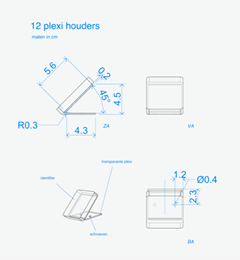
Indoor; When mounted flat on a table, they are not easy to trigger because of the angle. If you would like to mount them on a flat service always make sure to tilt them towards the visitor, preferably in a 45 degree angle
The IDentifier is able to trigger a Podcatcher within 30 cm on average.
If you would like to cover an IDentifier behind glass or in a casing, make sure to always test this first. Keep in mind that thick glass can limit the IR and Bluetooth signal coming from the IDentifier. A metal casing disturbes strongly.
Start IDentifiers
The minimum distance you have to keep in between is 30 cm. With multiple languages it’s best to hang them staggered diagonal from each other so the visitor does not accidentally activate another language when bringing the Podcatcher to his/her ear.
If you only have a limited space to place them, not enough room to place all your language IDentifiers, you can contact our helpdesk so we can make a change in the settings, which makes it possible to place them closer together.
There is a maximum of 1.9 GB. You can find more information about the Podcatcher in the Specsheet Podcatcher
See our specification sheet for more information https://help.guideid.com/kb/audio

 English
  Nederlands
  Français