
To access the tour settings, go to the tour page and click on Tour Settings located in the top-right corner of the page. This will open up the Tour Settings pop-up.
The Tour Settings pop-up displays general information about the tour. To apply any changes, make the necessary edits and then click the Save button.
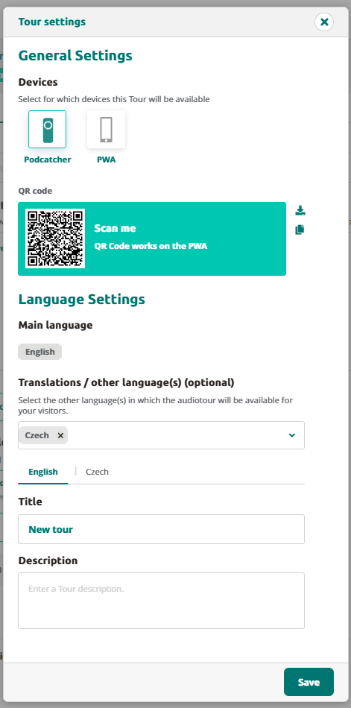
In the General Settings section, you can select which devices this tour will be available on.
In the Language Settings section below, you can select which languages the tour will be available in. Please note that it is not possible to change the main language of the tour once it has been set.
You can also customize the translated title and description of the tour for each available language.
By adjusting these settings, you can ensure that your tour is optimized for your target audience, making it more accessible and appealing to a wider range of users.
 English
  Nederlands
  Français