
How Can We Help?
Adding layers can serve a variety of functions, for example when your main audio fragment for a stop becomes lengthy, you can provide more detailed information by adding a layer. For instance, you can present historical background or details about an art piece as a separate layer. This way, visitors who are not as interested in the history can still enjoy the primary story of the art.
Adding layers
To add a layer to your tour, follow these steps:
- Click on a stop within the tour.
- Click on “Open clip view”
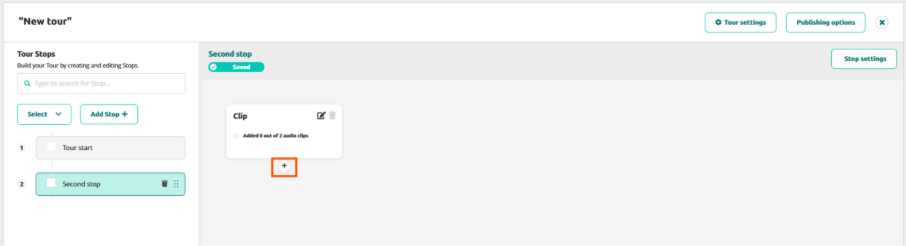
- Hover your mouse cursor over the clip, and a small “+” icon will appear.
- Click the “+” icon, and a new clip will appear with a line connecting it to the previous clip, labeled as “Auto play.”Users can choose any of the four options: A, B, C, or Auto Play

At this point, the layer has been added, and the purpose of adding the layer becomes relevant.
- If you want to include an optional segment of audio, click the “Auto Play” dropdown button and select any of the available A/B/C buttons. It’s essential to provide an explanation in the first clip to guide visitors. For example, you can include text such as “Press A to learn more about the painter’s life.”
- Multiple clips require more than one option or button. Simply click on the “+” icon . After selecting Button A, the lines connecting the clips will automatically change from “B” to “C” when clicking on “+” icon.
- You can click the group icon to group the clips together and ungroup them. Grouped clips share the outgoing connection, ensuring that the following clip remains the same regardless of the chosen option.
- You can click the group icon to group the clips together and ungroup them. Grouped clips share the outgoing connection, ensuring that the following clip remains the same regardless of the chosen option.
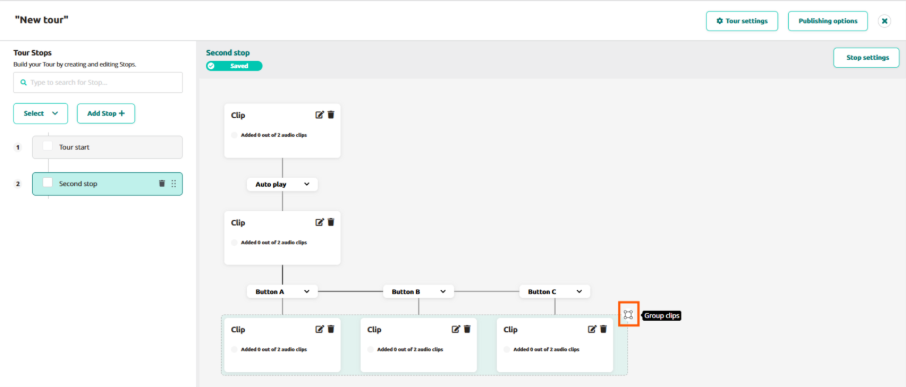
- For additional layers, click the “+” button below a clip or group and repeat the process. Note that if you want to chain a clip group to another group, you need to include an “in-between” clip. This step is crucial to ensure proper advancement through the tour, otherwise the Podcatcher wouldn’t know which of the following clips it needs to play to advance..
By incorporating layers into your tour, you can create a more engaging and interactive experience for visitors. These layers add depth, personalization, and an element of fun to your tours.
 English
  Nederlands
  Français